

Picture this: You ask an AI assistant to check your Google Drive for a client contract, debug a pesky error in your code, and book a flight for your next meeting—all without switching apps or wrestling with clunky integrations. This isn’t sci-fi. It’s the reality being built today with the Model Context Protocol (MCP) and MCP-powered AI agents.
MCP is an open-source framework shaking up how AI interacts with tools and data. Paired with autonomous agents, it’s creating smarter, more intuitive AI helpers that feel less like robots and more like teammates. Let’s unpack how it works, why it matters, and how it’s already transforming workflows.
What is the Model Context Protocol (MCP)?
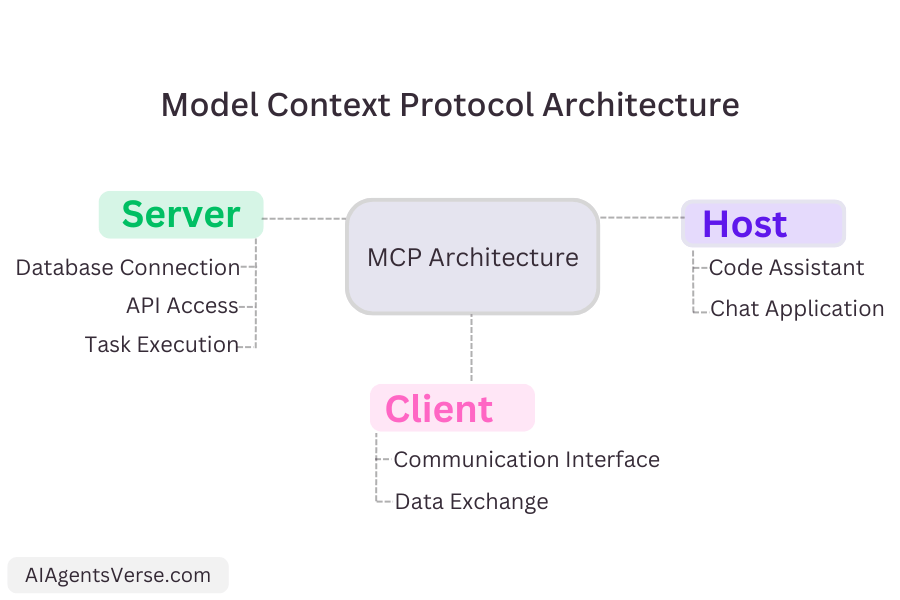
MCP is like a universal translator for AI. It’s a standardized protocol that lets large language models (LLMs) seamlessly connect to databases, apps, and tools—no custom code required. Think of it as the USB-C of AI, bridging gaps between systems that used to need hand-coded solutions.
- Key Components:
- MCP Host: The AI app you’re using (e.g., Claude in your IDE, a customer service chatbot).
- MCP Client: Manages communication between the host and external tools.
- MCP Server: Acts as a bridge between the AI and platforms like Slack, GitHub, or FedEx’s API.
- How It Works:
Let’s say you ask, “What’s the shipment status of my order #7890?” Here’s the MCP magic:- Your request goes to the MCP host (e.g., your AI assistant).
- The host connects to an MCP Server (FedEx’s logistics API).
- The server pulls live data: GPS location, weather delays, ETA.
- The LLM translates raw data into a human-friendly update:“Your package is delayed in Memphis due to storms but will arrive by Thursday.”
What Are MCP AI Agents?
AI agents are self-directed systems that do tasks, not just answer questions. With MCP, they become power users of your tech stack.
- Real-World Example:
“Generate a sales report for Q3 using HubSpot, Stripe, and our analytics.”- Step 1: The agent pulls data from HubSpot (CRM), Stripe (payments), and Snowflake (analytics) via MCP.
- Step 2: It merges datasets, flags issues (e.g., missing Stripe transactions), and auto-fixes gaps using historical averages.
- Step 3: Builds a dashboard in Looker Studio and emails it to stakeholders via Gmail—all through MCP integrations.
Why Businesses Are Betting on MCP + Agents
- Scalability: Add new tools by connecting MCP servers—no coding marathons.
- Flexibility: Swap LLMs or tools without rebuilding your stack.
- Security: Keep sensitive data in-house with local servers and strict access controls.
- Community Power: Tap into 1,000+ pre-built servers (Gmail, Postgres, Slack) to hit the ground running.
Conclusion
MCP isn’t just hype—it’s quietly transforming how AI interacts with the real world. By tearing down data silos and letting agents act autonomously, it’s turning “automation” from a buzzword into a true collaborator. Developers gain a universal toolkit; businesses unlock workflows that feel effortless.
The future isn’t about more apps—it’s about smarter connections. And MCP is wiring it all together.
Explore AI Agents Directory
FAQ
Q: How is MCP better than regular APIs?
A: APIs need custom code for every integration. MCP uses one protocol to connect any tool dynamically. Bonus: It handles two-way tasks, like pulling data and triggering actions (e.g., emailing reports).
Q: Can MCP work with sensitive data?
A: Absolutely. Host servers locally to keep data in your infrastructure, and use role-based access controls.
Q: What’s a non-tech use case for MCP?
A: Travel planning! Agents can check your calendar, book flights, and adjust hotel dates if meetings shift—all via connected apps.
Q: Do I need Claude to use MCP?
A: Nope. It’s model-agnostic—works with GPT-4, Gemini, or any LLM.
